Access Point:
Empecemos con el ap, el cual me da un problema gordo; si incluyo en los scripts del arranque del sistema ath0 en modo master, al llamar a hostapd el sistema se cuelga, y no responde mas que al boton de reboot. Nada que no se puede arreglar o evitar , por ejemplo, levantando los demonios a mano. (era un problema con las irq y las pci, creo que esta arreglado)
La configuracion es sencilla, hostapd y un script de inicio.
---------------------
/etc/hostapd/hostapd.conf :interface=ath0
driver=madwifi
logger_syslog=-1
logger_syslog_level=2
logger_stdout=-1
logger_stdout_level=2
debug=4
dump_file=/tmp/hostapd.dump
ctrl_interface=/var/run/hostapd
ctrl_interface_group=0
#hw_mode=g
ssid=miESSID
macaddr_acl=1
accept_mac_file=/etc/hostapd/mac-accept
auth_algs=3
eapol_key_index_workaround=0
eap_server=0
channel=6
wpa=3 ## IMPORTANTE!! He descubierto que usando en una debian la tarjeta atheros como ap, wpa debe ser igual a 2, (wpa=2), si no, la red no va nada bien
wpa_psk_file=/etc/hostapd/wpa_psk
wpa_key_mgmt=WPA-PSK
wpa_pairwise=CCMP
--------------------------
/etc/conf.d/hostapd (en gentoo) :# Space separated List of interfaces which needs to be started before
# hostapd
# Space separated list of configuration files
CONFIGS="/etc/hostapd/hostapd.conf"
# Extra options to pass to hostapd, see hostapd(8)
OPTIONS=""
-------------------
/etc/hostapd/wpa_psk y /etc/hostapd/mac-accept son dos archivos que deben existir;en wpa-psk estara vuestra clave del AP y en mac-accept las macs de los clientes que pueden conectarse al AP.
Se puede poner la clave en hostapd.conf directamente tal que "psk=misuperclave", pero el archivo wpa-psk permite indicar una clave por cada mac o una clave para todas las macs de los clientes ( 00:00:00:00:00:00 -> significa "todas las macs").
------------------
/etc/hostapd/wpa-psk :00:00:00:00:00:00 la-clave-super-secreta
-----------------
/etc/hostapd/mac-accept :
00:FF:FF:FF:FF:FF
00:11:22:33:44:55
00:FF:FF:FF:FF:FF
00:11:22:33:44:55
------------------
El script que inicia el ap es algo asi:
modprobe ath_pci autocreate=ap
ifconfig ath0 up
iwconfig ath0 rate 54M
iwconfig ath0 essid miESSID
ifconfig ath0 192.168.100.5
/etc/init.d/hostapd start
---------------
La cosa queda tal que asi (me encanta wavemon!) :

iwconfig :
lo no wireless extensions.
eth0 no wireless extensions.
wifi0 no wireless extensions.
ath0 IEEE 802.11g ESSID:"miESSID" Nickname:""
Mode:Master Frequency:2.422 GHz Access Point: 00:12:BB:BB:BB:BB
Bit Rate:0 kb/s Tx-Power:15 dBm Sensitivity=1/1
Retry:off RTS thr:off Fragment thr:off
Encryption key:xxxx-xxxx-xxxx-xxxx-xxxx-xxxx-xxxx-xxxx [x] Security mode:open
Power Management:off
Link Quality=37/70 Signal level=-57 dBm Noise level=-94 dBm
Rx invalid nwid:16185 Rx invalid crypt:0 Rx invalid frag:0
Tx excessive retries:0 Invalid misc:0 Missed beacon:0
ifconfig :
ath0 Link encap:Ethernet HWaddr 00:12:bb:bb:bb:bb
inet addr:192.168.100.5 Bcast:192.168.100.255 Mask:255.255.255.0
inet6 addr: fe80::212:bfff:fe5f:570b/64 Scope:Link
UP BROADCAST RUNNING MULTICAST MTU:2290 Metric:1
RX packets:170325 errors:0 dropped:0 overruns:0 frame:0
TX packets:250070 errors:0 dropped:6 overruns:0 carrier:0
collisions:0 txqueuelen:0
RX bytes:25110226 (23.9 MiB) TX bytes:264079235 (251.8 MiB)
eth0 Link encap:Ethernet HWaddr 00:0f:ea:b8:54:06
inet addr:xx.xx.xx.xx Bcast:255.255.255.255 Mask:255.255.240.0
inet6 addr: fe80::20f:eaff:feb8:5406/64 Scope:Link
UP BROADCAST RUNNING MULTICAST MTU:1500 Metric:1
RX packets:2100807 errors:0 dropped:0 overruns:0 frame:0
TX packets:2162878 errors:0 dropped:0 overruns:0 carrier:0
collisions:0 txqueuelen:1000
RX bytes:1228102328 (1.1 GiB) TX bytes:377167849 (359.6 MiB)
Interrupt:20
lo Link encap:Local Loopback
inet addr:127.0.0.1 Mask:255.0.0.0
inet6 addr: ::1/128 Scope:Host
UP LOOPBACK RUNNING MTU:16436 Metric:1
RX packets:677447 errors:0 dropped:0 overruns:0 frame:0
TX packets:677447 errors:0 dropped:0 overruns:0 carrier:0
collisions:0 txqueuelen:0
RX bytes:291580906 (278.0 MiB) TX bytes:291580906 (278.0 MiB)
wifi0 Link encap:UNSPEC HWaddr 00-12-bb-bb-bb-bb-bb-bb-00-00-00-00-00-00-00-00
UP BROADCAST RUNNING MULTICAST MTU:1500 Metric:1
RX packets:189761 errors:0 dropped:0 overruns:0 frame:54063
TX packets:252992 errors:2669 dropped:0 overruns:0 carrier:0
collisions:0 txqueuelen:199
RX bytes:33151270 (31.6 MiB) TX bytes:274008120 (261.3 MiB)
Interrupt:18
El script que inicia el ap es algo asi:
modprobe ath_pci autocreate=ap
ifconfig ath0 up
iwconfig ath0 rate 54M
iwconfig ath0 essid miESSID
ifconfig ath0 192.168.100.5
/etc/init.d/hostapd start
---------------
La cosa queda tal que asi (me encanta wavemon!) :
iwconfig :
lo no wireless extensions.
eth0 no wireless extensions.
wifi0 no wireless extensions.
ath0 IEEE 802.11g ESSID:"miESSID" Nickname:""
Mode:Master Frequency:2.422 GHz Access Point: 00:12:BB:BB:BB:BB
Bit Rate:0 kb/s Tx-Power:15 dBm Sensitivity=1/1
Retry:off RTS thr:off Fragment thr:off
Encryption key:xxxx-xxxx-xxxx-xxxx-xxxx-xxxx-xxxx-xxxx [x] Security mode:open
Power Management:off
Link Quality=37/70 Signal level=-57 dBm Noise level=-94 dBm
Rx invalid nwid:16185 Rx invalid crypt:0 Rx invalid frag:0
Tx excessive retries:0 Invalid misc:0 Missed beacon:0
ifconfig :
ath0 Link encap:Ethernet HWaddr 00:12:bb:bb:bb:bb
inet addr:192.168.100.5 Bcast:192.168.100.255 Mask:255.255.255.0
inet6 addr: fe80::212:bfff:fe5f:570b/64 Scope:Link
UP BROADCAST RUNNING MULTICAST MTU:2290 Metric:1
RX packets:170325 errors:0 dropped:0 overruns:0 frame:0
TX packets:250070 errors:0 dropped:6 overruns:0 carrier:0
collisions:0 txqueuelen:0
RX bytes:25110226 (23.9 MiB) TX bytes:264079235 (251.8 MiB)
eth0 Link encap:Ethernet HWaddr 00:0f:ea:b8:54:06
inet addr:xx.xx.xx.xx Bcast:255.255.255.255 Mask:255.255.240.0
inet6 addr: fe80::20f:eaff:feb8:5406/64 Scope:Link
UP BROADCAST RUNNING MULTICAST MTU:1500 Metric:1
RX packets:2100807 errors:0 dropped:0 overruns:0 frame:0
TX packets:2162878 errors:0 dropped:0 overruns:0 carrier:0
collisions:0 txqueuelen:1000
RX bytes:1228102328 (1.1 GiB) TX bytes:377167849 (359.6 MiB)
Interrupt:20
lo Link encap:Local Loopback
inet addr:127.0.0.1 Mask:255.0.0.0
inet6 addr: ::1/128 Scope:Host
UP LOOPBACK RUNNING MTU:16436 Metric:1
RX packets:677447 errors:0 dropped:0 overruns:0 frame:0
TX packets:677447 errors:0 dropped:0 overruns:0 carrier:0
collisions:0 txqueuelen:0
RX bytes:291580906 (278.0 MiB) TX bytes:291580906 (278.0 MiB)
wifi0 Link encap:UNSPEC HWaddr 00-12-bb-bb-bb-bb-bb-bb-00-00-00-00-00-00-00-00
UP BROADCAST RUNNING MULTICAST MTU:1500 Metric:1
RX packets:189761 errors:0 dropped:0 overruns:0 frame:54063
TX packets:252992 errors:2669 dropped:0 overruns:0 carrier:0
collisions:0 txqueuelen:199
RX bytes:33151270 (31.6 MiB) TX bytes:274008120 (261.3 MiB)
Interrupt:18
--------------
Clientes:
Con wpa_supplicant ha sido bastante sencillo.
Gentoo:
Con ipw2200 en gentoo configura /etc/conf.d/net y wpa_supplicant.conf, y ejecuta
$ ln -s /etc/init.d/net.lo /etc/init.d/net.eth1
$ rc-update add net.eth1 default
Esto para arrancar directamente al iniciar el sistema (gentoo way), si no, el comando para wpa_supplicant en terminal seria
$ wpa_supplicant -d -c /etc/wpa_supplicant/wpa_supplicant.conf -i eth1 -D wext
En caso de usar madwifi como cliente wpa, en /etc/conf.d/net habria que añadir "wpa_supplicant_eth1="-Dmadwifi", y en la terminal se arrancaria con
$ wpa_supplicant -d -c /etc/wpa_supplicant/wpa_supplicant.conf -i ath0 -D madwif
/etc/wpa_supplicant/wpa_supplicant.conf :
ctrl_interface=/var/run/wpa_supplicant
network={
bssid=00:bb:bb:bb:bb:bb
scan_ssid=0
ssid="miESSID"
key_mgmt=WPA-PSK
pairwise=CCMP
group=TKIP CCMP
psk="la-clave-super-secreta"
}
modules_eth1=( "wpa_supplicant" )
mode_eth1="managed"
essid_eth1="miESSID"
config_eth1=( "192.168.100.10 netmask 255.255.255.0" )
routes_eth1=("default via 192.168.100.5")
Clientes:
Con wpa_supplicant ha sido bastante sencillo.
Gentoo:
Con ipw2200 en gentoo configura /etc/conf.d/net y wpa_supplicant.conf, y ejecuta
$ ln -s /etc/init.d/net.lo /etc/init.d/net.eth1
$ rc-update add net.eth1 default
Esto para arrancar directamente al iniciar el sistema (gentoo way), si no, el comando para wpa_supplicant en terminal seria
$ wpa_supplicant -d -c /etc/wpa_supplicant/wpa_supplicant.conf -i eth1 -D wext
En caso de usar madwifi como cliente wpa, en /etc/conf.d/net habria que añadir "wpa_supplicant_eth1="-Dmadwifi", y en la terminal se arrancaria con
$ wpa_supplicant -d -c /etc/wpa_supplicant/wpa_supplicant.conf -i ath0 -D madwif
/etc/wpa_supplicant/wpa_supplicant.conf :
ctrl_interface=/var/run/wpa_supplicant
network={
bssid=00:bb:bb:bb:bb:bb
scan_ssid=0
ssid="miESSID"
key_mgmt=WPA-PSK
pairwise=CCMP
group=TKIP CCMP
psk="la-clave-super-secreta"
}
---------------
/etc/conf.d/net :modules_eth1=( "wpa_supplicant" )
mode_eth1="managed"
essid_eth1="miESSID"
config_eth1=( "192.168.100.10 netmask 255.255.255.0" )
routes_eth1=("default via 192.168.100.5")
----------------
y se ve asi (a que mola wavemon!) :
 iwconfig
lo no wireless extensions.
eth0 no wireless extensions.
eth1 IEEE 802.11g ESSID:"miESSID"
Mode:Managed Frequency:2.422 GHz Access Point: 00:12:bb:bb:bb:bb
Bit Rate:54 Mb/s Tx-Power=20 dBm Sensitivity=8/0
Retry limit:7 RTS thr:off Fragment thr:off
Encryption key:xxxx-xxxx-xxxx-xxxx-xxxx-xxxx-xxxx-xxx Security mode:open
Power Management:off
Link Quality=0/100 Signal level=-40 dBm Noise level=-87 dBm
Rx invalid nwid:0 Rx invalid crypt:7 Rx invalid frag:0
Tx excessive retries:0 Invalid misc:0 Missed beacon:97
lo no wireless extensions.
eth0 no wireless extensions.
eth1 IEEE 802.11g ESSID:"miESSID"
Mode:Managed Frequency:2.422 GHz Access Point: 00:12:bb:bb:bb:bb
Bit Rate:54 Mb/s Tx-Power=20 dBm Sensitivity=8/0
Retry limit:7 RTS thr:off Fragment thr:off
Encryption key:xxxx-xxxx-xxxx-xxxx-xxxx-xxxx-xxxx-xxx Security mode:open
Power Management:off
Link Quality=0/100 Signal level=-40 dBm Noise level=-87 dBm
Rx invalid nwid:0 Rx invalid crypt:7 Rx invalid frag:0
Tx excessive retries:0 Invalid misc:0 Missed beacon:97
-------------
Debian:
Con ralink rt73usb en debian testing arranca tambien al iniciar el sistema.
/etc/wpa_supplicant/wpa_supplicant.conf :
ctrl_interface=/var/run/wpa_supplicant
network={
bssid=00:12:bb:bb:bb:bb
scan_ssid=0
ssid="miESSID"
key_mgmt=WPA-PSK
pairwise=CCMP
group=TKIP CCMP
psk="la-clave-super-secreta"
}
lo no wireless extensions.
wmaster0 no wireless extensions.
wlan0 IEEE 802.11 ESSID:"miESSID"
Mode:Managed Frequency:2.422 GHz Access Point: 00:12:bb:bb:bb:bb
Bit Rate=54 Mb/s Tx-Power=14 dBm
Retry min limit:7 RTS thr:off Fragment thr=2352 B
Encryption key:xxxx-xxxx-xxxx-xxxx-xxxx-xxxx-xxxx-xxx-xxxx-xxxx-xxxx-xxx-xxxx-xxx-xxxx-xxxx [x]
Link Quality=75/100 Signal level=-68 dBm
Rx invalid nwid:0 Rx invalid crypt:0 Rx invalid frag:0
Tx excessive retries:0 Invalid misc:0 Missed beacon:0
Debian:
Con ralink rt73usb en debian testing arranca tambien al iniciar el sistema.
/etc/wpa_supplicant/wpa_supplicant.conf :
ctrl_interface=/var/run/wpa_supplicant
network={
bssid=00:12:bb:bb:bb:bb
scan_ssid=0
ssid="miESSID"
key_mgmt=WPA-PSK
pairwise=CCMP
group=TKIP CCMP
psk="la-clave-super-secreta"
}
------------
/etc/network/interfaces :
# The loopback network interface
auto lo
iface lo inet loopback
# The primary network interface
auto wlan0
iface wlan0 inet static
address 192.168.100.11
netmask 255.255.255.0
network 192.168.100.0
dns-nameservers 208.67.220.220 208.67.222.222
gateway 192.168.100.5
wireless-essid "miESSID"
wpadriver wext
wpa-conf /etc/wpa_supplicant/wpa_supplicant.conf
# The loopback network interface
auto lo
iface lo inet loopback
# The primary network interface
auto wlan0
iface wlan0 inet static
address 192.168.100.11
netmask 255.255.255.0
network 192.168.100.0
dns-nameservers 208.67.220.220 208.67.222.222
gateway 192.168.100.5
wireless-essid "miESSID"
wpadriver wext
wpa-conf /etc/wpa_supplicant/wpa_supplicant.conf
-------------
iwconfig :lo no wireless extensions.
wmaster0 no wireless extensions.
wlan0 IEEE 802.11 ESSID:"miESSID"
Mode:Managed Frequency:2.422 GHz Access Point: 00:12:bb:bb:bb:bb
Bit Rate=54 Mb/s Tx-Power=14 dBm
Retry min limit:7 RTS thr:off Fragment thr=2352 B
Encryption key:xxxx-xxxx-xxxx-xxxx-xxxx-xxxx-xxxx-xxx-xxxx-xxxx-xxxx-xxx-xxxx-xxx-xxxx-xxxx [x]
Link Quality=75/100 Signal level=-68 dBm
Rx invalid nwid:0 Rx invalid crypt:0 Rx invalid frag:0
Tx excessive retries:0 Invalid misc:0 Missed beacon:0
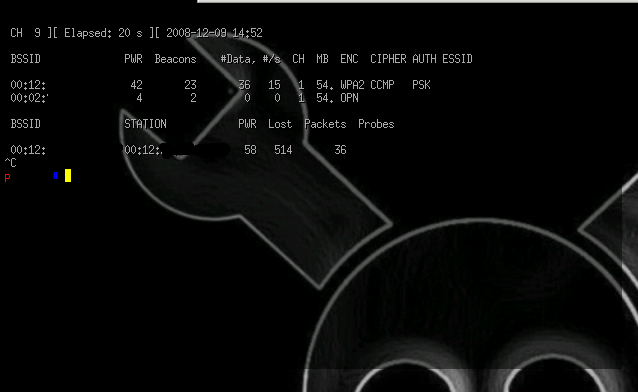
Una captura de airodump-ng de regalo: