Access Point:
Let's start with the AP:
Easy setup, hostapd and a start bash script.
---------------------
/etc/hostapd/hostapd.conf :interface=ath0
driver=madwifi
logger_syslog=-1
logger_syslog_level=2
logger_stdout=-1
logger_stdout_level=2
debug=4
dump_file=/tmp/hostapd.dump
ctrl_interface=/var/run/hostapd
ctrl_interface_group=0
#hw_mode=g
ssid=miESSID
macaddr_acl=1
accept_mac_file=/etc/hostapd/mac-accept
auth_algs=3
eapol_key_index_workaround=0
eap_server=0
channel=6
wpa=3 ## IMPORTATN! I just discovered that using an atheros card in debian as ap, wpa must be equal to 2 (wpa=2), or conecction will be fucked up
wpa_psk_file=/etc/hostapd/wpa_psk
wpa_key_mgmt=WPA-PSK
wpa_pairwise=CCMP
--------------------------
/etc/conf.d/hostapd (for gentoo) :# Space separated List of interfaces which needs to be started before
# hostapd
# Space separated list of configuration files
CONFIGS="/etc/hostapd/hostapd.conf"
# Extra options to pass to hostapd, see hostapd(8)
OPTIONS=""
-------------------
/etc/hostapd/wpa_psk and /etc/hostapd/mac-accept must be created;In wpa-psk file must be you wpa password and in mac-accept all the client's macs that are allowed to connect with the AP. You can set the password directly inside hostapd.conf with "psk=myUbberPassword", but using a file as wpa-psk makes it more flexible and lets you chose one password for each client mac. ( 00:00:00:00:00:00 -> " password for all client macs ") . Examples down here:
------------------
/etc/hostapd/wpa-psk :00:00:00:00:00:00 myUbberPassword
-----------------
/etc/hostapd/mac-accept :
00:FF:FF:FF:FF:FF
00:11:22:33:44:55
00:FF:FF:FF:FF:FF
00:11:22:33:44:55
------------------
This is the script to start the AP:
modprobe ath_pci autocreate=ap
ifconfig ath0 up
iwconfig ath0 rate 54M
iwconfig ath0 essid miESSID
ifconfig ath0 192.168.100.5
/etc/init.d/hostapd start
---------------
With the AP running it looks like this (I love wavemon!) :

iwconfig :
lo no wireless extensions.
eth0 no wireless extensions.
wifi0 no wireless extensions.
ath0 IEEE 802.11g ESSID:"miESSID" Nickname:""
Mode:Master Frequency:2.422 GHz Access Point: 00:12:BB:BB:BB:BB
Bit Rate:0 kb/s Tx-Power:15 dBm Sensitivity=1/1
Retry:off RTS thr:off Fragment thr:off
Encryption key:xxxx-xxxx-xxxx-xxxx-xxxx-xxxx-xxxx-xxxx [x] Security mode:open
Power Management:off
Link Quality=37/70 Signal level=-57 dBm Noise level=-94 dBm
Rx invalid nwid:16185 Rx invalid crypt:0 Rx invalid frag:0
Tx excessive retries:0 Invalid misc:0 Missed beacon:0
ifconfig :
ath0 Link encap:Ethernet HWaddr 00:12:bb:bb:bb:bb
inet addr:192.168.100.5 Bcast:192.168.100.255 Mask:255.255.255.0
inet6 addr: fe80::212:bfff:fe5f:570b/64 Scope:Link
UP BROADCAST RUNNING MULTICAST MTU:2290 Metric:1
RX packets:170325 errors:0 dropped:0 overruns:0 frame:0
TX packets:250070 errors:0 dropped:6 overruns:0 carrier:0
collisions:0 txqueuelen:0
RX bytes:25110226 (23.9 MiB) TX bytes:264079235 (251.8 MiB)
eth0 Link encap:Ethernet HWaddr 00:0f:ea:b8:54:06
inet addr:xx.xx.xx.xx Bcast:255.255.255.255 Mask:255.255.240.0
inet6 addr: fe80::20f:eaff:feb8:5406/64 Scope:Link
UP BROADCAST RUNNING MULTICAST MTU:1500 Metric:1
RX packets:2100807 errors:0 dropped:0 overruns:0 frame:0
TX packets:2162878 errors:0 dropped:0 overruns:0 carrier:0
collisions:0 txqueuelen:1000
RX bytes:1228102328 (1.1 GiB) TX bytes:377167849 (359.6 MiB)
Interrupt:20
lo Link encap:Local Loopback
inet addr:127.0.0.1 Mask:255.0.0.0
inet6 addr: ::1/128 Scope:Host
UP LOOPBACK RUNNING MTU:16436 Metric:1
RX packets:677447 errors:0 dropped:0 overruns:0 frame:0
TX packets:677447 errors:0 dropped:0 overruns:0 carrier:0
collisions:0 txqueuelen:0
RX bytes:291580906 (278.0 MiB) TX bytes:291580906 (278.0 MiB)
wifi0 Link encap:UNSPEC HWaddr 00-12-bb-bb-bb-bb-bb-bb-00-00-00-00-00-00-00-00
UP BROADCAST RUNNING MULTICAST MTU:1500 Metric:1
RX packets:189761 errors:0 dropped:0 overruns:0 frame:54063
TX packets:252992 errors:2669 dropped:0 overruns:0 carrier:0
collisions:0 txqueuelen:199
RX bytes:33151270 (31.6 MiB) TX bytes:274008120 (261.3 MiB)
Interrupt:18
This is the script to start the AP:
modprobe ath_pci autocreate=ap
ifconfig ath0 up
iwconfig ath0 rate 54M
iwconfig ath0 essid miESSID
ifconfig ath0 192.168.100.5
/etc/init.d/hostapd start
---------------
With the AP running it looks like this (I love wavemon!) :
iwconfig :
lo no wireless extensions.
eth0 no wireless extensions.
wifi0 no wireless extensions.
ath0 IEEE 802.11g ESSID:"miESSID" Nickname:""
Mode:Master Frequency:2.422 GHz Access Point: 00:12:BB:BB:BB:BB
Bit Rate:0 kb/s Tx-Power:15 dBm Sensitivity=1/1
Retry:off RTS thr:off Fragment thr:off
Encryption key:xxxx-xxxx-xxxx-xxxx-xxxx-xxxx-xxxx-xxxx [x] Security mode:open
Power Management:off
Link Quality=37/70 Signal level=-57 dBm Noise level=-94 dBm
Rx invalid nwid:16185 Rx invalid crypt:0 Rx invalid frag:0
Tx excessive retries:0 Invalid misc:0 Missed beacon:0
ifconfig :
ath0 Link encap:Ethernet HWaddr 00:12:bb:bb:bb:bb
inet addr:192.168.100.5 Bcast:192.168.100.255 Mask:255.255.255.0
inet6 addr: fe80::212:bfff:fe5f:570b/64 Scope:Link
UP BROADCAST RUNNING MULTICAST MTU:2290 Metric:1
RX packets:170325 errors:0 dropped:0 overruns:0 frame:0
TX packets:250070 errors:0 dropped:6 overruns:0 carrier:0
collisions:0 txqueuelen:0
RX bytes:25110226 (23.9 MiB) TX bytes:264079235 (251.8 MiB)
eth0 Link encap:Ethernet HWaddr 00:0f:ea:b8:54:06
inet addr:xx.xx.xx.xx Bcast:255.255.255.255 Mask:255.255.240.0
inet6 addr: fe80::20f:eaff:feb8:5406/64 Scope:Link
UP BROADCAST RUNNING MULTICAST MTU:1500 Metric:1
RX packets:2100807 errors:0 dropped:0 overruns:0 frame:0
TX packets:2162878 errors:0 dropped:0 overruns:0 carrier:0
collisions:0 txqueuelen:1000
RX bytes:1228102328 (1.1 GiB) TX bytes:377167849 (359.6 MiB)
Interrupt:20
lo Link encap:Local Loopback
inet addr:127.0.0.1 Mask:255.0.0.0
inet6 addr: ::1/128 Scope:Host
UP LOOPBACK RUNNING MTU:16436 Metric:1
RX packets:677447 errors:0 dropped:0 overruns:0 frame:0
TX packets:677447 errors:0 dropped:0 overruns:0 carrier:0
collisions:0 txqueuelen:0
RX bytes:291580906 (278.0 MiB) TX bytes:291580906 (278.0 MiB)
wifi0 Link encap:UNSPEC HWaddr 00-12-bb-bb-bb-bb-bb-bb-00-00-00-00-00-00-00-00
UP BROADCAST RUNNING MULTICAST MTU:1500 Metric:1
RX packets:189761 errors:0 dropped:0 overruns:0 frame:54063
TX packets:252992 errors:2669 dropped:0 overruns:0 carrier:0
collisions:0 txqueuelen:199
RX bytes:33151270 (31.6 MiB) TX bytes:274008120 (261.3 MiB)
Interrupt:18
--------------
Clients:
Really easy with wpa_supplicant.
Gentoo:
With ipw2200 card in gentoo just configure /etc/conf.d/net and wpa_supplicant.conf, and run
$ ln -s /etc/init.d/net.lo /etc/init.d/net.eth1
$ rc-update add net.eth1 default
... as root for starting connection on boot (gentoo way).
If you just want to start it from the shell run :
$ wpa_supplicant -d -c /etc/wpa_supplicant/wpa_supplicant.conf -i eth1 -D wext
With madwifi/atheros card just add "wpa_supplicant_eth1="-Dmadwifi" to /etc/conf.d/net . From shell you can connect with :
wpa_supplicant -d -c /etc/wpa_supplicant/wpa_supplicant.conf -i ath0 -D madwif
/etc/wpa_supplicant/wpa_supplicant.conf :
ctrl_interface=/var/run/wpa_supplicant
network={
bssid=00:bb:bb:bb:bb:bb
scan_ssid=0
ssid="miESSID"
key_mgmt=WPA-PSK
pairwise=CCMP
group=TKIP CCMP
psk="myUbberPassword"
}
modules_eth1=( "wpa_supplicant" )
mode_eth1="managed"
essid_eth1="miESSID"
config_eth1=( "192.168.100.10 netmask 255.255.255.0" )
routes_eth1=("default via 192.168.100.5")
Clients:
Really easy with wpa_supplicant.
Gentoo:
With ipw2200 card in gentoo just configure /etc/conf.d/net and wpa_supplicant.conf, and run
$ ln -s /etc/init.d/net.lo /etc/init.d/net.eth1
$ rc-update add net.eth1 default
... as root for starting connection on boot (gentoo way).
If you just want to start it from the shell run :
$ wpa_supplicant -d -c /etc/wpa_supplicant/wpa_supplicant.conf -i eth1 -D wext
With madwifi/atheros card just add "wpa_supplicant_eth1="-Dmadwifi" to /etc/conf.d/net . From shell you can connect with :
wpa_supplicant -d -c /etc/wpa_supplicant/wpa_supplicant.conf -i ath0 -D madwif
/etc/wpa_supplicant/wpa_supplicant.conf :
ctrl_interface=/var/run/wpa_supplicant
network={
bssid=00:bb:bb:bb:bb:bb
scan_ssid=0
ssid="miESSID"
key_mgmt=WPA-PSK
pairwise=CCMP
group=TKIP CCMP
psk="myUbberPassword"
}
---------------
/etc/conf.d/net :modules_eth1=( "wpa_supplicant" )
mode_eth1="managed"
essid_eth1="miESSID"
config_eth1=( "192.168.100.10 netmask 255.255.255.0" )
routes_eth1=("default via 192.168.100.5")
----------------
It looks like this (wavemon again!) :
 iwconfig
lo no wireless extensions.
eth0 no wireless extensions.
eth1 IEEE 802.11g ESSID:"miESSID"
Mode:Managed Frequency:2.422 GHz Access Point: 00:12:bb:bb:bb:bb
Bit Rate:54 Mb/s Tx-Power=20 dBm Sensitivity=8/0
Retry limit:7 RTS thr:off Fragment thr:off
Encryption key:xxxx-xxxx-xxxx-xxxx-xxxx-xxxx-xxxx-xxx Security mode:open
Power Management:off
Link Quality=0/100 Signal level=-40 dBm Noise level=-87 dBm
Rx invalid nwid:0 Rx invalid crypt:7 Rx invalid frag:0
Tx excessive retries:0 Invalid misc:0 Missed beacon:97
lo no wireless extensions.
eth0 no wireless extensions.
eth1 IEEE 802.11g ESSID:"miESSID"
Mode:Managed Frequency:2.422 GHz Access Point: 00:12:bb:bb:bb:bb
Bit Rate:54 Mb/s Tx-Power=20 dBm Sensitivity=8/0
Retry limit:7 RTS thr:off Fragment thr:off
Encryption key:xxxx-xxxx-xxxx-xxxx-xxxx-xxxx-xxxx-xxx Security mode:open
Power Management:off
Link Quality=0/100 Signal level=-40 dBm Noise level=-87 dBm
Rx invalid nwid:0 Rx invalid crypt:7 Rx invalid frag:0
Tx excessive retries:0 Invalid misc:0 Missed beacon:97
-------------
Debian:
With ralink rt73usb in debian testing it starts at boot with /etc/network/interfaces :
/etc/wpa_supplicant/wpa_supplicant.conf :
ctrl_interface=/var/run/wpa_supplicant
network={
bssid=00:12:bb:bb:bb:bb
scan_ssid=0
ssid="miESSID"
key_mgmt=WPA-PSK
pairwise=CCMP
group=TKIP CCMP
psk="myUbberPassword"
}
# The loopback network interface
auto lo
iface lo inet loopback
# The primary network interface
auto wlan0
iface wlan0 inet static
address 192.168.100.11
netmask 255.255.255.0
network 192.168.100.0
dns-nameservers 208.67.220.220 208.67.222.222
gateway 192.168.100.5
wireless-essid "miESSID"
wpadriver wext
wpa-conf /etc/wpa_supplicant/wpa_supplicant.conf
iwconfig :
lo no wireless extensions.
wmaster0 no wireless extensions.
wlan0 IEEE 802.11 ESSID:"miESSID"
Mode:Managed Frequency:2.422 GHz Access Point: 00:12:bb:bb:bb:bb
Bit Rate=54 Mb/s Tx-Power=14 dBm
Retry min limit:7 RTS thr:off Fragment thr=2352 B
Encryption key:xxxx-xxxx-xxxx-xxxx-xxxx-xxxx-xxxx-xxx-xxxx-xxxx-xxxx-xxx-xxxx-xxx-xxxx-xxxx [x]
Link Quality=75/100 Signal level=-68 dBm
Rx invalid nwid:0 Rx invalid crypt:0 Rx invalid frag:0
Tx excessive retries:0 Invalid misc:0 Missed beacon:0
Debian:
With ralink rt73usb in debian testing it starts at boot with /etc/network/interfaces :
/etc/wpa_supplicant/wpa_supplicant.conf :
ctrl_interface=/var/run/wpa_supplicant
network={
bssid=00:12:bb:bb:bb:bb
scan_ssid=0
ssid="miESSID"
key_mgmt=WPA-PSK
pairwise=CCMP
group=TKIP CCMP
psk="myUbberPassword"
}
------------
/etc/network/interfaces :# The loopback network interface
auto lo
iface lo inet loopback
# The primary network interface
auto wlan0
iface wlan0 inet static
address 192.168.100.11
netmask 255.255.255.0
network 192.168.100.0
dns-nameservers 208.67.220.220 208.67.222.222
gateway 192.168.100.5
wireless-essid "miESSID"
wpadriver wext
wpa-conf /etc/wpa_supplicant/wpa_supplicant.conf
lo no wireless extensions.
wmaster0 no wireless extensions.
wlan0 IEEE 802.11 ESSID:"miESSID"
Mode:Managed Frequency:2.422 GHz Access Point: 00:12:bb:bb:bb:bb
Bit Rate=54 Mb/s Tx-Power=14 dBm
Retry min limit:7 RTS thr:off Fragment thr=2352 B
Encryption key:xxxx-xxxx-xxxx-xxxx-xxxx-xxxx-xxxx-xxx-xxxx-xxxx-xxxx-xxx-xxxx-xxx-xxxx-xxxx [x]
Link Quality=75/100 Signal level=-68 dBm
Rx invalid nwid:0 Rx invalid crypt:0 Rx invalid frag:0
Tx excessive retries:0 Invalid misc:0 Missed beacon:0
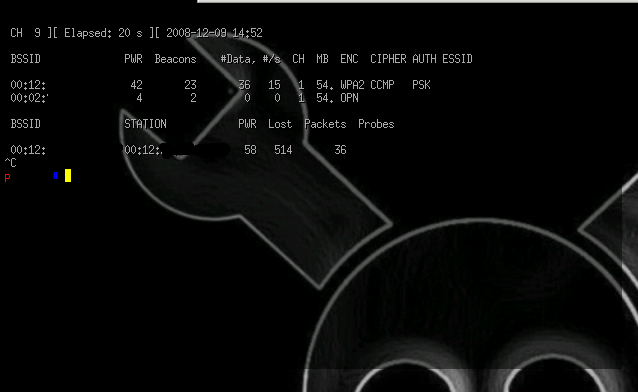
Airodump-ng screenshot: